11.06.13 | Permalink | Comments Off on Time for Twitter?

I’ve gotten a few left-handed comments that I haven’t written anything other than tweets about Twitter’s upcoming IPO and that this was unfair given the amount of scrutiny I shared with the other big social media IPO of Facebook.
Fair commentary particularly because as a potential investor, I view Twitter much the way I viewed Facebook pre-IPO. Namely, it’s a bad investment at the valuation being shopped for individual investors.
What is Twitter (for the 3 of you who don’t use it…) – fundamentally it serves 2 purposes: it is a mechanism to publish short messages to the public who happen to subscribe to your channel and as a means to read short messages from an aggregation of channels to which you subscribe.
In other words, if you are a celebrity, brand, or business, you might use twitter messages (tweets) to share information with your fans, loyalists, or customers. If you are an individual, you might choose to follow people, causes, or companies that interest you so you can have the latest information about them in one place. Twitter proposes to make money by charging to acquire more followers for your channel and to insert advertising into the message streams of twitter readers. Essentially for Facebook users, it’s the status line without the other Facebook cruft and there is no expectation of a bi-lateral relationship. A person can choose to follow another person without the expectation of reciprocation.
So what’s the difference between Facebook and Twitter? The real difference to me is, I use Twitter on a daily basis for personal and business activities. It’s a useful tool that I generally like. Though I have to say, the monetization is diluting the value of the tool for me and I am looking for alternatives as a result. Also, I’m not enamored with the treatment of developers by Twitter.
Finally, a $1.2B revenue run-rate without profitability is a problem for me as an investor. I understand investing for growth but it’s equally true that companies can do this at least at a break-even level so one can have confidence that when the investment cycle comes to an end, that profitability is on the horizon.
Bottom line: Twitter seems to be a generally good company. The IPO will serve the company’s interest and current shareholder’s interest in raising capital and providing liquidity. Perhaps as the markets have a chance to weigh in, there will come a time (Facebook at $16/share, hello!) where there is an attractive entry point, but that’s not likely this week.
Hopefully the old lady from Peoria doesn’t put her life savings into TWTR stock at IPO time because we’ll be reading about how the IPO was a flop because she’ll have a paper loss to reflect. Read the S1. Understand the risks. Make a good decision for you. And above all, caveat emptor! I’m going to sit this one out myself.
 Photo Credit: Charles Russo
A small concrete bridge was built to span Pilarcitos Creek in Half Moon Bay, California in 1900. The bridge is narrow, old, and in need of some attention. In 2010, a study recommended replacing the bridge and a Federal grant was sought to help finance the replacement. The grant was awarded to the city, pledging to cover 88% of construction cost provided certain requirements of the replacement structure were met (CEQA, ADA, etc.)
Over the past year, the City of Half Moon Bay staff have been engaging with the community with numerous outreach meetings, second opinions, and public reactions. Universally, the feedback from the community has been “wait a minute, why don’t we just repair the bridge?” This reaction seems to have been unanticipated and unwelcome to City Staff and bridge consultants who had only prepared replacement options rather than repair options.
In the past few months, 2 repair options were introduced to be considered but were doomed to fail given the rating system criteria and the fact that the repair options were being ranked by the same people who believed bridge replacement was the best option.
The community, fearing a railroad job, has become ever more active on making its voice heard on this topic organizing a “Save our Bridge” campaign and collecting 1,400 signatures in the past week to deliver to City Council at last night’s meeting.
Last night, after receiving the signatures, hearing from over 20 people in the public comment section of the meeting to repair, rather than replace the bridge, voted 4-1 to demolish and replace the structure with a complete closure for a minimum of 3 months during the summer (aka Option 2.)
The 250+ words above are facts. The words below are my interpretation of what this means.
The City Council majority (Kowalczyk, Fraser, Patridge, and Muller) have demonstrated clearly and unequivocally that they do not understand the basic economics of their City. About $4M of the City’s budget is provided by sales tax revenue and a large portion of that comes from the collection of small, independently owned businesses on Main Street. A majority of customers for the Main Street corridor are visitors to the San Mateo coast who are looking for a fun time with a minimum of hassle; any barrier to this outcome reduces foot traffic, which reduces sales, which reduces jobs, which reduces sales tax revenue.
Fundamentally, City Council has aimed a loaded gun at the City’s head and pulled the trigger with this decision. If you like large, soulless chain stores, then you’re happy with this result because the little guys, the ones who operate businesses on Main Street, can’t go for the year or so it will require to replace the bridge without getting paid. The City is only now recovering from the 2009 meltdown which saw about 1/3 of businesses close on Main Street. Now the City is voluntarily starting the next downturn. It’s crazy.
Does something need to be done with the bridge? Yes. But repair, even if the City has to bear 100% of the cost, is by far the least expensive and destructive option and that option isn’t being considered seriously.
In the recent past another elected body ignored the voice of the community, the Coastside Fire Protection Board. As a result of their lack of responsiveness to the community voice it saw a majority of its members recalled with 2/3 majority vote. I’m not a proponent of recalls personally, but when the elected officials don’t listen to their constituents, recall becomes the only remaining tool to use.
City Council has sent a message to the business community on Main Street: Screw You. I wouldn’t be surprised, given that this is a business life/death situation, if the Main Street business community doesn’t dig in and send a reciprocal message to Mayor Kowalczyk and Council Members Muller, Fraser, and Patridge.
Watch this space, things are about to get interesting.
06.05.13 | Permalink | Comments Off on Google Glass Kerfluffel

As Google Glass has made its way out of the Labs and into the earlier adopter community, there have been many strident reactions, policies drafted, and hands wrung. People wearing them are being christened “glassholes” and prominent early adopters are being skewered for playing with their new found toys. It reminds me of what’s about to happen with flying and floating drones. That’s another entry.
What is Google Glass? In short, it’s wearable computing that delivers first generation augmented reality capabilities. If you watched Pranav Mistry’s TED Talk of a few years ago, this is Google’s first attempt to make that world available to consumers and to move Android from phones/tablets into a new space.
I believe Google is to be commended for taking a big step into a brave new world on this technology. Wearable computing and augmented reality as part of our daily lives is inevitable and I like this as a first step. However, like all first attempts, there are going to be some growing pains and if history is any guide, Glass is more likely to flop than flourish.
When can you get yours? First you have to apply as to why you should get one and then pony up $1,500 for the privilege. Kind of like the early days of Gmail with invites on steroids.
Like all tools, these can be used for good or evil, that’s up to the person behind the lens. I’m curious to see how it will all play out over the next 5 years.
Amazon 2012 Financials (source EDGAR)
Click to Enlarge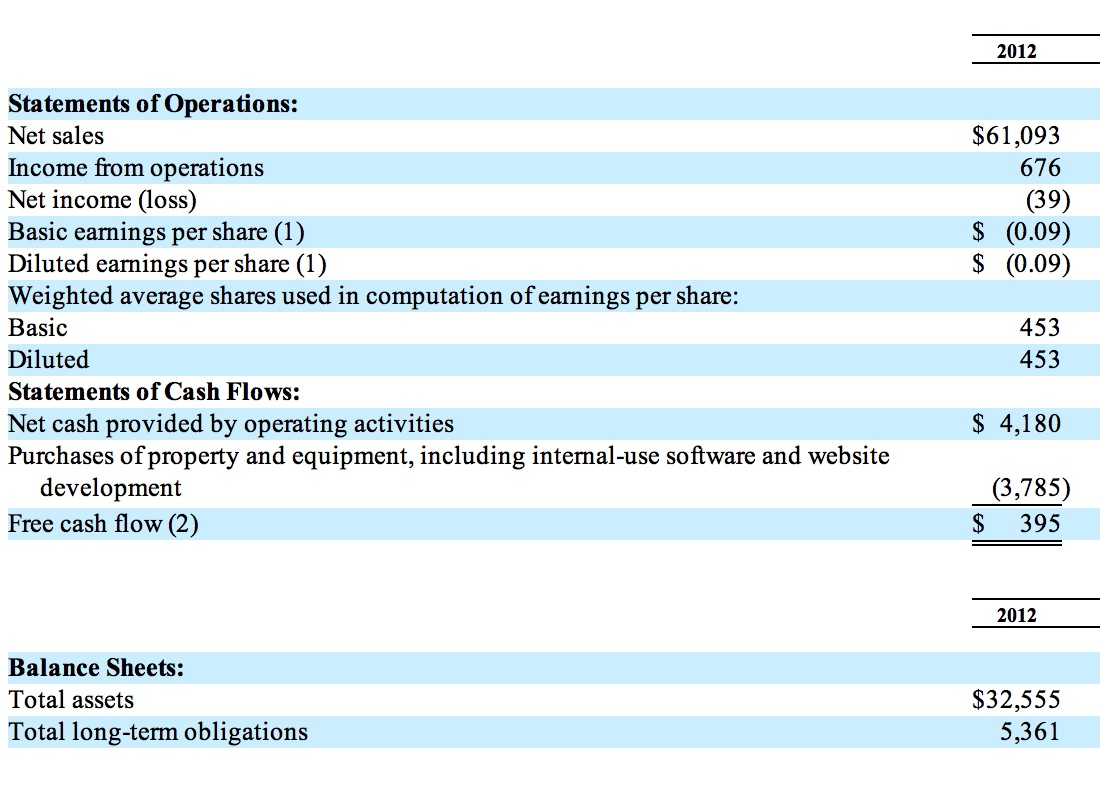
One of the most fascinating things I’ve witnessed over the course of my career is the increased frequency and ease with which markets are changing. Technology is a catalyst in that and now we are seeing the change in markets accelerate from centuries to decades to single digit years just in the span of the last 50 years.
I’d like to zero in on one flavor of these changes in this post concentrating on two market change concepts: market disruption and market destruction. It’s difficult to tell which is happening until after the fact, so let’s start with some definitions/examples and then enter the discussion about their relative merits.
Market disruption is when a well established business or set of inter-dependent businesses which have been doing business in one way successfully for some period of time face a new set of conditions (materials pricing, technological changes, etc.) that force a fundamental change in relationships between these businesses and their suppliers, partners, competitors, and customers.
There are many examples of market disruption; my current favorite is the person-to-person ride share application Uber and how it’s impacting the taxi marketplace.
If you’ve ever ridden in a taxi, you know they are nasty, dirty, expensive, and unpleasant – at best. With Uber, individuals are able to connect to other willing individuals in near real-time to arrange a lift and the passenger then provides a “donation” to compensate the driver. Predictably, there are rooms full of taxi drivers whining about the fact that Uber drivers are de facto taxi drivers not subject to the same costs of doing business that they are forced to pay. If Uber and its competitors are successful, the notion of taxi companies, medallions, etc. are over. That’s a powerful market disruption being driven by the ubiquity of mobile devices and a clever application applied to a new business model in an existing inefficient market.
While taxi companies and traditional taxi drivers may suffer from this transition, taxi riders and “new” taxi drivers benefit from it having disintermediated the regulatory agencies and existing companies. The reason this is disruption is that after the event, there is still a viable market with profit available for participants post-disruption.
Market destruction shares many of the same characteristics of market disruption with the key difference being the lack of profit for remaining participants in the same market segment. The best current example I can provide for this is Amazon book selling. Back in the early days of internet 1.0 circa 199X, Amazon was disrupting the publishing market using electronic commerce coupled with volume purchase methods. The industry was old, inefficient, and brittle and was ripe for the picking. Amazon accelerated this change with the introduction of the Kindle and monetization of eBooks in the internet 2.0 era. Now post internet 2.0 you’ve got a company (Amazon) producing $61,093,000,000 ($61B) of sales in a single year (2012) incapable of producing a profit. They lost $39M in this same year (and admittedly, Amazon is much more than books these days, and yes, free cash flow does count for something.)
I would argue that what has happened to traditional book publishing and selling started as market disruption and morphed into market destruction as there is no remaining profit pool for participants. Unlike the Uber example, authors are not being directly connected to readers via technology with “publish on-demand” technology taking the cost out of production where we see a new, more efficient market driven by technology. Instead, we see a single company (Amazon) dominating a segment while producing no profit for shareholders and depressing prices artificially (because shareholders aren’t demanding a profit) so it’s impractical, probably impossible, for any other company to compete on an even footing.
Now in retrospect, it’s become clear that the book publishing/selling market has gone through a market destruction and will remain in that state until either Amazon shareholders demand consistent profitability or an Uber like approach can be used to create another market disruption that disintermediates Amazon. Fascinating to think about how that might come about.
For the record, I’m all for market disruption. In a very real way I’ve benefited from these transitions repeatedly throughout my career. I have very mixed feelings about market destruction. It reminds me of the dumping practices of semi-conductor companies in the 1980’s and smacks of anti-competitive practices. But, it’s tough to tell one from the other in real-time and frequently only becomes clear after the fact what we’re dealing with.
As a consumer and as an investor, you get to vote for which model you believe in. Next time you’re pressing the “Buy Now” button on Amazon, think for a moment if you want to continue to perpetuate their market destruction model. If you’re an Amazon shareholder, consider sending a message to Bezos and the Board that it’s time to provide a little ROI – the price per share can’t be sustained with the present course and speed.
Disclosure: I have no financial interest in the companies mentioned in this post. However, my Spouse is a writer and I’d like to see her compensated for her efforts rather than simply “donate” her work into the current system.

Disclosure: I am a Yahoo shareholder.
Last week Yahoo CEO Marissa Mayer declared remote workers obsolete at the portal company. You can read all about the decision if you simply do a search on “Yahoo remote workers” and read until your heart is content.
About 15 years ago in Silicon Valley, it became possible to work outside the office environment effectively due to an increase in bandwidth, better mobile devices (laptops and phones primarily,) and a move toward software as the primary workspace for innovation. In the right circumstances, work from home (WFH) is a powerful tool that unleashes creativity, boosts productivity, enables a company to tap into talent that wouldn’t be accessible under normal “office” rules, and allows the company to save big $$$ on real estate and associated costs by having a smaller work space dedicated to staff.
Sun Microsystems was an early proponent of WFH and “flexible offices” where an employee could become essentially a floater and choose to work where they like. Options included full home office setups, the coffee shop, on the road, or in special on-site hotel-like environments where work space could be reserved for a temporary stint. Things have progressed since then with actual working video conference software, online collaboration tools, etc. and companies, large and small are depending upon WFH as a tool to help grow their business.
But WFH is not all puppy dogs and rainbows, there is a tradeoff. As worker and work are distributed, one loses a “center” and “community” associated with the joint activity in question. Serendipity of ideas drop steeply. The cultural aspect of the organization is strongly diluted or potentially lost.
Earlier on I said the circumstances have to be right for WFH to make sense. There are 3 aspects to the circumstances: the worker’s capability, the requirements of the job, and the state of the company.
Let’s start with the worker. An ideal candidate for a WFH worker is competent, confident, and independent. This worker does not heavily rely on others to learn on the job or teach on the job. This worker has the self-discipline to create structure and boundaries between their personal and professional lives and is not a “high touch” / “think out loud” kind of person in their work habits. The person is happiest when working independently and is highly productive in that mode. Many information workers fit this bill exactly.
Even if the worker is an ideal candidate, the role must also be conducive to WFH. Ideally, the role would require minimal physical interaction with others to begin with. The content of the role enables the worker performing the job to be largely successful through the fruits of their own labor. The results delivered by the role are tangible in some way – measurable minimally – and form the basis for judgment in the relative performance of the person in the role. Visibility requirements of the person performing the role should be minimal. Interaction required by the role should be manageable via technology – audio/video conference, web meetings, mail, etc. Many information technology roles fit this requirement.
Finally, even if the worker and the role are right, the company must be in the right state for WFH. If the company is in a fundamental transition or has high uncertainty, it’s tough to be remote and still be connected as the company navigates the changes. If the company is shrinking or failing, it’s tough to be remote and help change the trajectory. If the company has allowed “retirement in place” or has hired and/or retained a disproportionate number of “B” players, WFH is a death knell and will accelerate the deterioration of the company and its prospects.
If any one of these circumstances of worker, role, or company is not right, one misses the benefits of WFH and still experiences the downside of WFH.
Despite all the ink about how Ms. Mayer’s decision is regressive and will hurt Yahoo, I think she is being realistic about where the company is in its lifecycle and is taking steps to transform it from where it is toward a better future. There are sure to be negative effects from the decision. Yet in balance, I believe she is making a tradeoff to avoid the downside risks of WFH while refocusing the company and moving toward a turnaround.
No one likes it when freedoms previously available are taken away, especially those employees affected by decisions like this. But when the choice is same speed and trajectory leading toward no employment vs. unpopular decisions that make survival at least possible, I believe it’s important to acknowledge the difficult choice and support the leaders driving the change.
As a fractional owner of Yahoo, this decision is the latest data point that demonstrates to me that Ms. Mayer is serious about changing the prospects of the company and reaffirms my decision to hold a long position in the company.
« Previous Entries